| TL;DR More than five consecutive failed attempts can trigger an automatic lock. Stop at four.NIST’s current guidance requires a 15-character minimum for passwords used as single-factor authentication. The widely repeated 8-character figure is from a superseded revision.A login that succeeds but shows a half-empty dashboard is not a login problem. It is a verification problem.Check whether the service is actually down last, not first. It rarely is. Short version: the login box is the least likely thing to be broken, and every extra attempt you make actively worsens your position. |
The instinct when a password fails is to try it again. Then to try it with the caps lock off. Then to try the other password, the one from the old account, and by then you are four attempts in and one away from a problem considerably larger than the one you started with.
More than five consecutive failed attempts can trigger an automatic lock on the account. That is a security feature working correctly and it is also a self-inflicted wound, because the lock takes longer to clear than the original issue would have.
Stop at Four
Four is the working limit. If the fourth attempt fails, stop typing and switch to the account recovery workflow rather than the login form.
This feels like giving up early. It is not. The difference between recovering from a forgotten password and recovering from a locked account is measured in hours, and the only thing standing between them is a fifth attempt that was never going to work anyway.
The diagnostic order that follows is set out in full in this guide to Amazon Seller Central login problems, which works through password resets, two-factor recovery, browser state and the lockout path as separate branches rather than one troubleshooting blob.
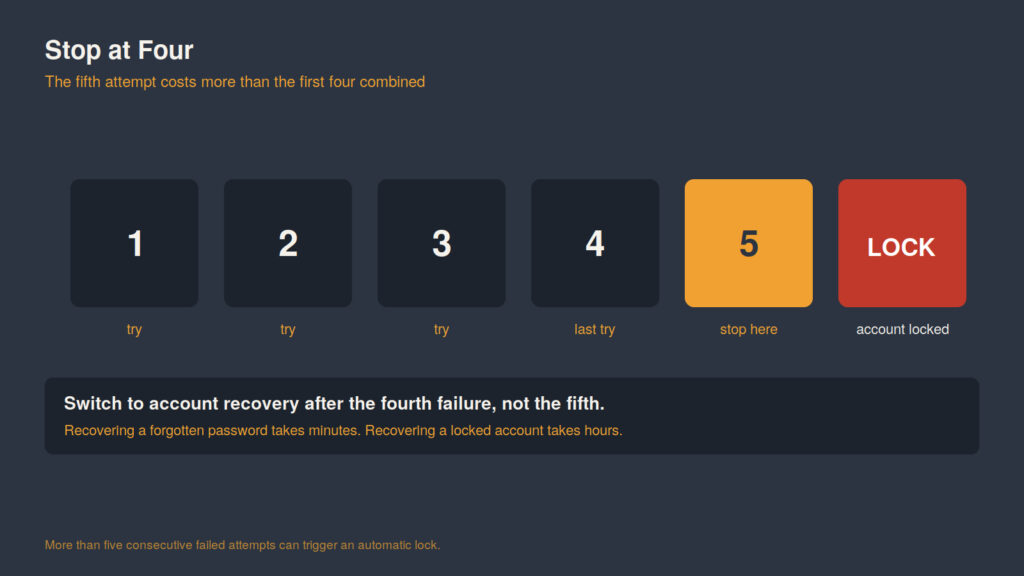
The fifth attempt is the expensive one. Switch to recovery after the fourth.
The Password Advice Has Changed
Most password guidance circulating online is out of date, and the direction of the change surprises people.
The destination guide recommends a minimum of 12 characters mixing letters, numbers and symbols, which is sound practical advice. The federal standard is now stricter on length. NIST’s Digital Identity Guidelines, SP 800-63B Revision 4, require that passwords used as a single-factor authentication mechanism be a minimum of 15 characters. Where multi-factor authentication is in place, the minimum drops to eight.
Two things follow from that pairing, and they are more useful than the numbers alone.
Length is doing the work, not complexity. The old advice to mix symbols and digits was a proxy for entropy, and a long passphrase beats a short cryptic string on that measure comfortably.
And the standard explicitly relaxes the length requirement when a second factor is present. That is the clearest possible signal about where the security actually comes from.
Which Brings Us to the Second Factor
CISA describes multi-factor authentication as a layered approach in which a compromised credential is not sufficient on its own, because the unauthorized user still cannot satisfy the second requirement.
On a seller account that layer is protecting a payout destination, which is why the recovery path is deliberately slow. It is also why the single highest-value five minutes available to any seller is registering a backup authentication method while they still have access to the primary one.
The failure mode is boring and extremely common: the phone number attached to two-step verification belongs to a device or a carrier plan the seller no longer has. Nothing about that is a login problem in any meaningful sense, and it produces a multi-day outage.
Use an authenticator app rather than SMS, and register a backup. Both are free and neither is interesting enough to do on a normal day, which is precisely why they do not get done.
The Diagnostic Order
Work these in sequence. The order is by likelihood, not by how dramatic each sounds.
| # | Check | Symptom that points here |
| 1 | Is verification still pending | You get in, but half the dashboard is missing or greyed out |
| 2 | Is the second factor pointed at a device you still have | Password accepted, then nothing arrives |
| 3 | Is this the right regional account | Credentials rejected outright, but they work elsewhere |
| 4 | Is it browser state | Works in a private window, fails in the normal one |
| 5 | Is the service down | Everything above checks out |
The first row is the one most often misread, because the login itself succeeds. Registration and verification are separate states, and an account can be fully registered, correctly credentialed, and still functionally inert while a review sits open. Nothing in the interface says so plainly.
Row four is worth two minutes before escalating anything. A stale session cookie produces symptoms that look exactly like a credential failure, and a private window is a free test that distinguishes them.
Why “Is It Down” Belongs Last
Checking whether the platform is down is the first thing most people do and the last thing that is usually true.
It happens, and when it does it is obvious within a minute because it affects everyone at once. The reason it belongs at the bottom of the list is not that outages are impossible. It is that treating an outage as the hypothesis stops you from looking at the five more likely causes, all of which are things you can actually fix.
The Preventative Version
Everything above is reactive. The preventative version is three items and takes about ten minutes.
Register a backup two-factor method now, on an authenticator app, and store the recovery codes somewhere that is not the same device. Set the account’s contact phone to a number you expect to keep. And if more than one person needs access, give each of them their own user permission rather than sharing one login, because a shared credential means a shared lockout and no way to tell who triggered it.
Ten minutes, once. The alternative is discovering the gap on the morning a settlement is due.